1. Verticalresponse
  2. Vertical Response Classic (VRC)
  3. Email
  4. Canvas

Adding Cell Padding to a table

Avatar
Karissa
January 15, 2021 19:56
Follow

Adding Cell Padding

If you would like to pull text or images away from the side of your table you can add cell padding to your table.

1. Start by clicking within your table and select Table Properties.
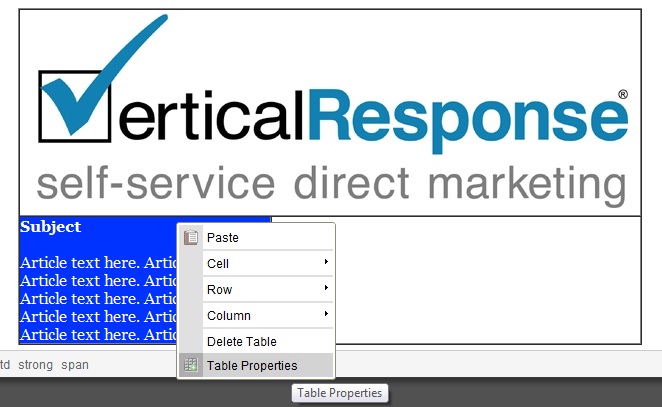
rtaImage.jpg

2. From the Table Properties menu, enter the pixel count that you would like to add as a buffer and click OK.
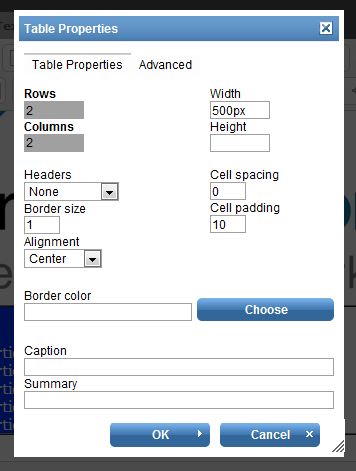
rtaImage.jpg

3. Once you are finished you can see that the text has buffer space between it the edge of the table.

rtaImage.jpg

Was this article helpful?
0 out of 0 found this helpful
Have more questions? Submit a request

Comments

0 comments

Please sign in to leave a comment.

Articles in this section

  • Creating a New Table
  • Setting an Outer Border in a table
  • Setting Cell Width in a table
  • Adding a Banner to a Table
  • Adding Cell Padding to a table
  • How do I create email links using the Canvas editor?
  • Can I customize the placement of the Social Sharing icons in my email?
  • Creating a New Table
  • Do hosted versions have tracked links?
  • Why does VerticalResponse change the links within my email?
See more
Powered by Zendesk